You are viewing an Archived item in your Knowledge Base, it is not publicly accessible.

Contact Us

If you still have questions or prefer to get help directly from an agent, please submit a request.
We’ll get back to you as soon as possible.

Please fill out the contact form below and we will reply as soon as possible.

  • Knowledge Base MINI
  • Contact us
English (US)
US English (US)
DE German
  • Home
  • Working with orderbird PRO
  • orderbird PRO - Versions and Updates

Items with identical names are no longer possible in orderbird 5.5

Written by Jens B.

Updated at December 16th, 2022

Contact Us

If you still have questions or prefer to get help directly from an agent, please submit a request.
We’ll get back to you as soon as possible.

Please fill out the contact form below and we will reply as soon as possible.

  • First Steps
    Hello new Bird! About your Apple devices Step 1: How to set up your network Step 2: MY orderbird Step 3: How to install and set up the app Step 4 - How to serve your first guest Step 5 - Card payment with orderbird PRO
  • Working with orderbird PRO
    Working Settings Fiscalization in Austria (RKSV) "Kassensicherungsverordnung" in Germany orderbird PRO - Versions and Updates
  • Card payment
    Your start with card payment with orderbird PRO and Worldline Your start with card payment with orderbird PRO and Nexi Germany Your start with American Express Working with orderbird card payment Pay Terminal Plus (WiFi card reader) Pay Terminal One (Bluetooth card reader) Card payment on the smartphone
  • Analyze your sales
    Reports on orderbird PRO The DATEV export Reports on MY orderbird
  • Printer & Network
    Printer Network
  • Expand your orderbird PRO
    orderbird PRO Cashbook orderbird Gift Cards Bestellmanagement
  • MY orderbird - Your orderbird business account
    Your account settings on MY orderbird
+ More

On top of new features we are also implementing measures to increase performance stability. The previous months have taught us that you really enjoy the ‘copy’-feature in the settings in order to display items with the same name across one or more categories. There are some practical advantages to duplicate items, for example, it makes it so much easier to navigate your menu when you can display the “Espresso” in the same category as your cakes.

Unfortunately, this practice can lead to stability problems in some cases which is why we decided to make sure that items with duplicate names cannot exist in the future. Of course, you can still create copies of items, you will just need to name them differently - for example “Espresso #2, Espresso #3,…”.

To be well prepared for the coming update, we will automatically change the names of duplicate items in your menu in the following logic:

  • If you have two duplicate items, we will add a * to the second item  (e.g. “Espresso” and “Espresso*”)
  • If the item exists more than two times, we will add numbers to the items (e.g. “Espresso”, “Espresso*”, “Espresso #2”, “Espresso #3”, …)

This how it could look like:OBApp_5-4_EN_NoDuplicates.jpg
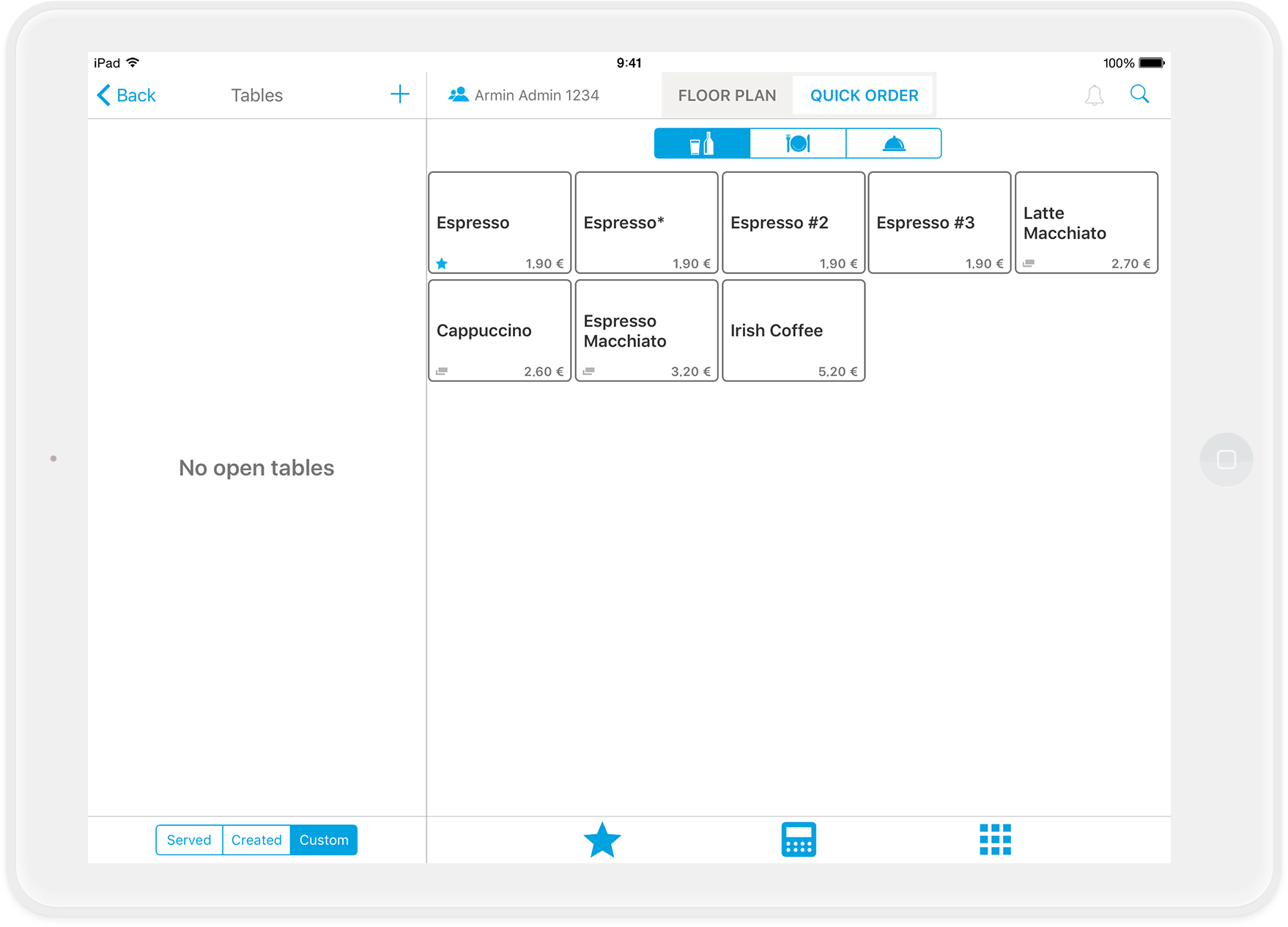
IMPORTANT: Please do not change the names of automatically renamed articles and do not create new duplicate articles with identical names. This can cause problems when you install the new app version.

no-dupes duplicates

Was this article helpful?

Yes
No
Give feedback about this article

Related Articles

  • What is the latest version of orderbird PRO?
030 208 983 098

About orderbird

With over 17,000 customers — restaurants, cafés, bars, clubs, and beer gardens — orderbird is one of the leading Point of Sales systems for the hospitality industry in Europe. With the mobile POS system orderbird MINI, orderbird also offers a smart cash register solution for service providers, retailers, mobile hospitality, and the crafts.

orderbird was founded in 2011 and today employs more than 120 people.

Address

orderbird GmbH
Ritterstraße 12
D-10969 Berlin
Phone: 030 208 983 098

Opening hours

Monday: 09:00 - 18:00
Tuesday: 09:00 - 18:00
Wednesday: 09:00 - 18:00
Thursday: 09:00 - 18:00
Friday: 09:00 - 18:00
Saturday: Closed (except emergency support)
Sunday: Closed (except for emergency support)


© 2026 orderbird GmbH
  • Imprint
  • Privacy Policy
  • Legal Notice
Expand