Contact Us

If you still have questions or prefer to get help directly from an agent, please submit a request.
We’ll get back to you as soon as possible.

Please fill out the contact form below and we will reply as soon as possible.

  • Knowledge Base MINI
  • Contact us
English (US)
US English (US)
DE German
  • Home
  • Working with orderbird PRO
  • Fiscalization in Austria (RKSV)
  • First steps: Getting ready for the RKSV

Step 1: Sign up for fiskaltrust - you are invited

Written by Jens B.

Updated at July 4th, 2025

Contact Us

If you still have questions or prefer to get help directly from an agent, please submit a request.
We’ll get back to you as soon as possible.

Please fill out the contact form below and we will reply as soon as possible.

  • First Steps
    Hello new Bird! About your Apple devices Step 1: How to set up your network Step 2: MY orderbird Step 3: How to install and set up the app Step 4 - How to serve your first guest Step 5 - Card payment with orderbird PRO
  • Working with orderbird PRO
    Working Settings Fiscalization in Austria (RKSV) "Kassensicherungsverordnung" in Germany orderbird PRO - Versions and Updates
  • Card payment
    Your start with card payment with orderbird PRO and Worldline Your start with card payment with orderbird PRO and Nexi Germany Your start with American Express Working with orderbird card payment Pay Terminal Plus (WiFi card reader) Pay Terminal One (Bluetooth card reader) Card payment on the smartphone
  • Analyze your sales
    Reports on orderbird PRO The DATEV export Reports on MY orderbird
  • Printer & Network
    Printer Network
  • Expand your orderbird PRO
    orderbird PRO Cashbook orderbird Gift Cards Bestellmanagement
  • MY orderbird - Your orderbird business account
    Your account settings on MY orderbird
+ More

Table of Contents

The link in the email can only be clicked once! Password requirements What if I didn't receive the invitation? Please do not register independently with fiskaltrust

We, in partnership with fiskaltrust, offer a secure, tamper-proof cash register solution. 

Follow these steps to complete your registration with fiskaltrust:

  1. You should have received an email invitation from fiskaltrust with the subject: “fiskaltrust.Portal | Einladung zu fiskaltrust und Anfrage zur Verbindung mit [name of your company]”.        
  2. The mail provides a link to the online portal of fiskaltrust.               

    The link in the email can only be clicked once!

     After that, it becomes invalid, and we will need to send you a new invitation. It’s best to complete registration in one go.

     
  3. Click the link provided in the email. Set a password for your fiskaltrust account and confirm it by entering it twice.              

    Password requirements

    The password must be at least six characters long and must contain at least one letter and one number.

     
  4. Click on “AGB” to open the portal’s Terms and Conditions in a new window. After reading them, close the window by clicking “Schließen” to return to the login page.
  5. Tick the box "AGB gelesen und akzeptiert" and click "Weiter".
  6. Your personalized customer contract will appear. Please read it carefully.
  7. Click on “AGB” to open the terms for cash register vendors in a new window. After reading, close the window by clicking “Schließen” to return to the contract.
  8. Tick the box "AGB gelesen und akzeptiert".
  9. Enter your full name in the "Unterzeichner/Unterzeichnerin*" field at the end of the contract.               
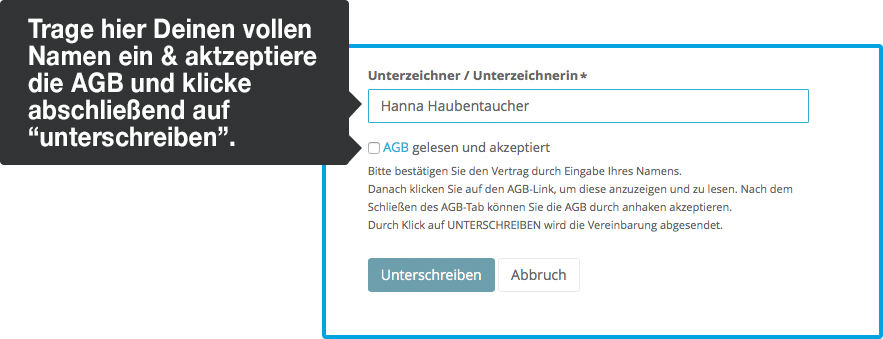
  10. Click "Unterschreiben" to agree the contract.
  11. After completing registration, you’ll receive an email titled "fiskaltrust.Portal | Willkommen als fiskaltrust.RegistrierkassenBETREIBER CRM:00XXXXX".                
    This email contains your registration details. Keep it safe and enter the information into your Overview of your RKSV login data, codes and IDs for fiscalization. 

What if I didn't receive the invitation?

In this case, please contact us at help@orderbird.com and we will resend it to you.

Please do not register independently with fiskaltrust

Only if you register via the link provided in the e-mail will your cash register automatically be assigned to orderbird as your POS system dealer


<< Back to the Overview
Step 1/8
Next step >>
invite registration mental health

Was this article helpful?

Yes
No
Give feedback about this article

Related Articles

  • Let's get started with Fiscalization | Your Step-by-Step Guide to orderbird PRO and fiskaltrust
  • Overview of your RKSV login data, codes, and IDs
  • Step 2: Obtain all access data for FinanzOnline.at
  • Step 3: Creating a Registrierkassen-WebService on FinanzOnline.at
  • Step 4: Introduce yourself to fiskaltrust and add your personal data
030 208 983 098

About orderbird

With over 17,000 customers — restaurants, cafés, bars, clubs, and beer gardens — orderbird is one of the leading Point of Sales systems for the hospitality industry in Europe. With the mobile POS system orderbird MINI, orderbird also offers a smart cash register solution for service providers, retailers, mobile hospitality, and the crafts.

orderbird was founded in 2011 and today employs more than 120 people.

Address

orderbird GmbH
Ritterstraße 12
D-10969 Berlin
Phone: 030 208 983 098

Opening hours

Monday: 09:00 - 18:00
Tuesday: 09:00 - 18:00
Wednesday: 09:00 - 18:00
Thursday: 09:00 - 18:00
Friday: 09:00 - 18:00
Saturday: Closed (except emergency support)
Sunday: Closed (except for emergency support)


© 2026 orderbird GmbH
  • Imprint
  • Privacy Policy
  • Legal Notice
Expand