Contact Us

If you still have questions or prefer to get help directly from an agent, please submit a request.
We’ll get back to you as soon as possible.

Please fill out the contact form below and we will reply as soon as possible.

  • Knowledge Base MINI
  • Contact us
English (US)
US English (US)
DE German
  • Home
  • Working with orderbird PRO
  • Fiscalization in Austria (RKSV)
  • First steps: Getting ready for the RKSV

Step 3: Creating a Registrierkassen-WebService on FinanzOnline.at

Written by Jens B.

Updated at July 4th, 2025

Contact Us

If you still have questions or prefer to get help directly from an agent, please submit a request.
We’ll get back to you as soon as possible.

Please fill out the contact form below and we will reply as soon as possible.

  • First Steps
    Hello new Bird! About your Apple devices Step 1: How to set up your network Step 2: MY orderbird Step 3: How to install and set up the app Step 4 - How to serve your first guest Step 5 - Card payment with orderbird PRO
  • Working with orderbird PRO
    Working Settings Fiscalization in Austria (RKSV) "Kassensicherungsverordnung" in Germany orderbird PRO - Versions and Updates
  • Card payment
    Your start with card payment with orderbird PRO and Worldline Your start with card payment with orderbird PRO and Nexi Germany Your start with American Express Working with orderbird card payment Pay Terminal Plus (WiFi card reader) Pay Terminal One (Bluetooth card reader) Card payment on the smartphone
  • Analyze your sales
    Reports on orderbird PRO The DATEV export Reports on MY orderbird
  • Printer & Network
    Printer Network
  • Expand your orderbird PRO
    orderbird PRO Cashbook orderbird Gift Cards Bestellmanagement
  • MY orderbird - Your orderbird business account
    Your account settings on MY orderbird
+ More

Table of Contents

Who should proceed: you or your tax consultant? Excursus for your tax consultancy Proceeding without a tax consultant?

Since you use an online solution for your cash register with orderbird and fiskaltrust, this step will guide you through creating a user for the "Registrierkassen-WebService" in addition to your regular user on FinanzOnline.at.

Who should proceed: you or your tax consultant?

At this stage, you have the option to pause and let your tax consultant handle the registration for the Registrierkassen-WebService. They are familiar with the process and can manage it on your behalf, but keep in mind that different rules apply to them according to the Federal Ministry of Finance (BMF).

Excursus for your tax consultancy

The Federal Ministry of Finance provides a detailed manual for tax advisors: Handbuch as PDF in German 

Refer to section 4.1.3 on page 54 for relevant instructions. 

Tax consultants should navigate to the menu "Eingaben" > “Registrierkassen” for a tailored interface (according to the BMF, tax advisors use a different interface than their clients). Therefore, tax consultants must follow the instructions above to create the "Benutzer für den Registrierkassen-WebService".


Proceeding without a tax consultant?

If you’re handling this yourself, great job! Follow these steps to set up your own Registrierkassen-WebService:

  1. Log in to https://finanzonline.bmf.gv.at using the access data provided by your tax office.  
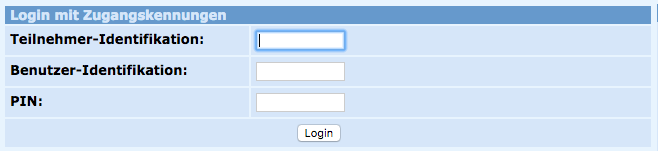
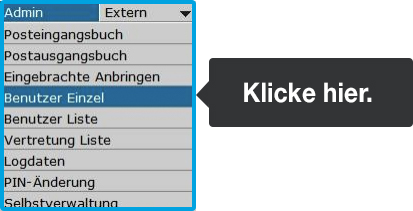
  2. Click on “Admin” in the top navigation bar. In the new window, select "Benutzer Einzel".  
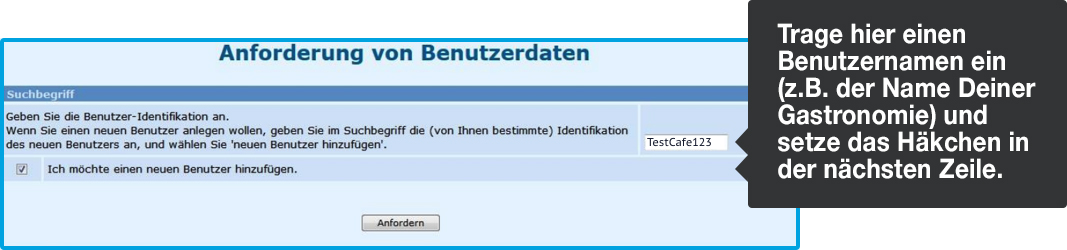
  3. Enter the "Benutzer-Identifikation" of your choice in the search field on the right side and check the box "Ich möchte einen neuen Benutzer anlegen". Click "Anfordern".  
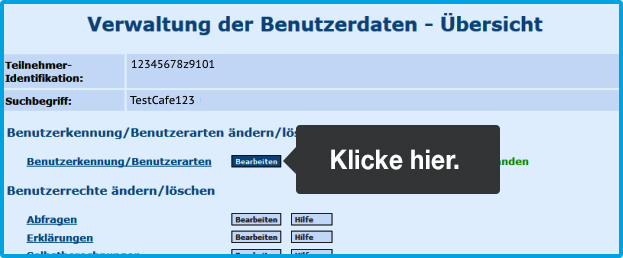
  4. In the following window, click on "Bearbeiten" under "Benutzererkennung/Benutzerarten":  
  5. Create a "Start PIN" of your choice and confirm it by entering it again in the corresponding field. (The Start PIN must be 8–12 characters long and include at least one letter and one number. Special characters are not allowed). For “Benutzer für Registrierkassen-WebService”, select “Ja”. Confirm your entries by clicking "Weiter":  
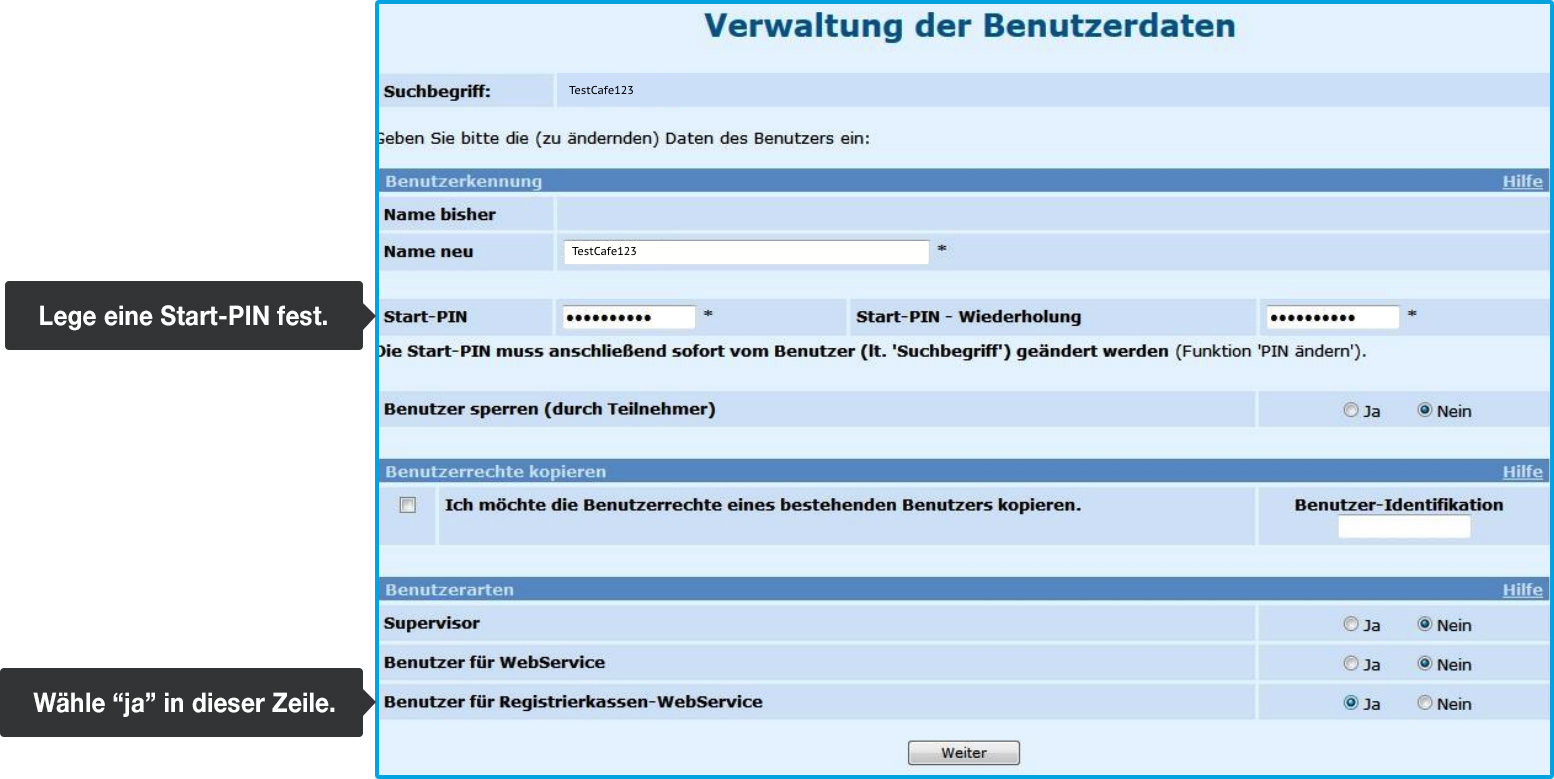
  6. At the bottom of the next page, titled "Verwaltung der Benutzerdaten-Übersicht", find the "Benutzer anlegen" section and click “Daten prüfen”:  

  7. In the subsequent window, review all saved changes to ensure accuracy.
  8. If all data is correct, finalize the registration. Enter your new user identification and PIN on your overview.   
    Note: The participant identification is the same as for your regular FinanzOnline.at access data.   
    Now log out by clicking on the “Ende” at the top of the page.

Need to make some corrections? Click on “zur Übersicht” at the bottom of the page to adjust your entries.


<< Back to Step 2
Step 3/8
Next Step >>
financial online register service

Was this article helpful?

Yes
No
Give feedback about this article

Related Articles

  • Let's get started with Fiscalization | Your Step-by-Step Guide to orderbird PRO and fiskaltrust
  • Overview of your RKSV login data, codes, and IDs
  • Step 1: Sign up for fiskaltrust - you are invited
  • Step 2: Obtain all access data for FinanzOnline.at
  • Step 4: Introduce yourself to fiskaltrust and add your personal data
030 208 983 098

About orderbird

With over 17,000 customers — restaurants, cafés, bars, clubs, and beer gardens — orderbird is one of the leading Point of Sales systems for the hospitality industry in Europe. With the mobile POS system orderbird MINI, orderbird also offers a smart cash register solution for service providers, retailers, mobile hospitality, and the crafts.

orderbird was founded in 2011 and today employs more than 120 people.

Address

orderbird GmbH
Ritterstraße 12
D-10969 Berlin
Phone: 030 208 983 098

Opening hours

Monday: 09:00 - 18:00
Tuesday: 09:00 - 18:00
Wednesday: 09:00 - 18:00
Thursday: 09:00 - 18:00
Friday: 09:00 - 18:00
Saturday: Closed (except emergency support)
Sunday: Closed (except for emergency support)


© 2026 orderbird GmbH
  • Imprint
  • Privacy Policy
  • Legal Notice
Expand